


Microsoft has released the KB5053606 cumulative update for Windows 10 22H2 and Windows 10 21H2, which fixes numerous bugs, including one preventing SSH connections.
The Windows 10 KB5053606 update is mandatory as it contains Microsoft's March 2025 Patch Tuesday security updates, which fix six actively exploited zero-day vulnerabilities.
Windows users can install this update by going into Settings, clicking on Windows Update, and manually performing a 'Check for Updates.'
However, as this update is mandatory, it will automatically start installing in Windows once you check for updates. To make this more manageable, you can schedule a time when your computer is restarted to finish the installation.
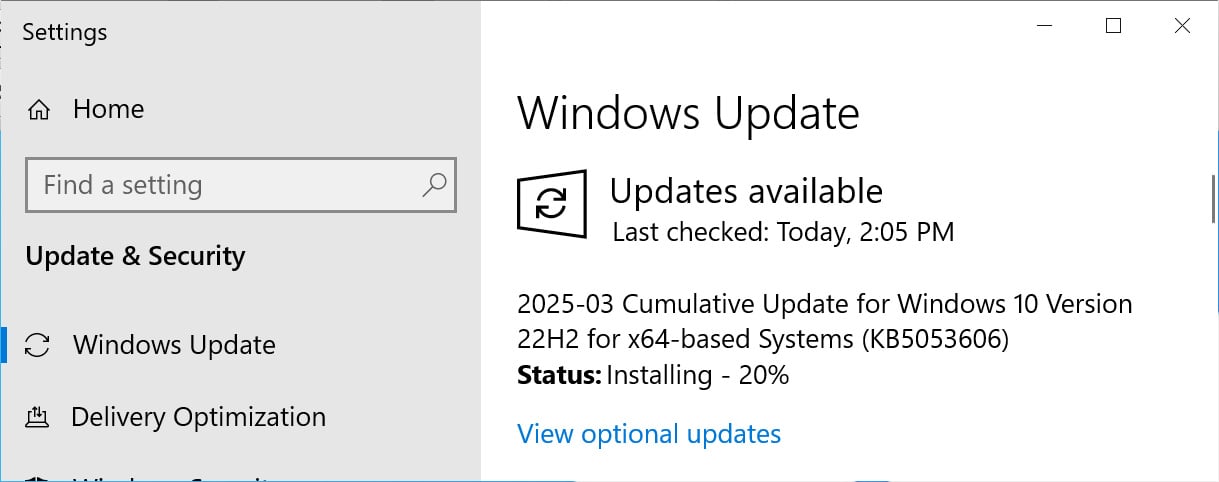
Source: BleepingComputer
After installing this update, Windows 10 22H2 will be updated to build 19045.5608 and Windows 10 21H2 will be build 19044.5608.
Windows 10 users can also manually download and install the KB5053606 update from the Microsoft Update Catalog.
What's new in Windows 10 KB5053606
The KB5053606 update includes fixes for numerous bugs in Windows 10, including one that caused the OpenSSH service not to start and prevent connections.
This update includes nine fixes or changes, which are listed below.
-
[Daylight saving time (DST)] This update supports DST changes in Paraguay.
-
[Narrator]
-
Fixed: It fails to say the Chinese IME candidate window quick action buttons right.
-
Fixed: It does not say the control type for the Chinese IME suggestion opt-in item.
-
Fixed: It does not say the heading of the Chinese IME suggestion opt-in panel.
-
-
[Input Method Editor (IME)]
-
Fixed: The Chinese IME stops responding when you change the font family or font size.
-
Fixed: The color contrast ratio of the Chinese IME search suggestion panel is less than you expect.
-
-
[Desktop Window Manager (dwm.exe}] Fixed: Dwm.exe stops responding many times.
-
[Country and Operator Settings Asset] This update brings COSA profiles up to date for certain mobile operators.
-
[Open Secure Shell (OpenSSH) (known issue)] Fixed: The service fails to start, which stops SSH connections. There is no detailed logging, and you must run the sshd.exe process manually.
Microsoft says that there are two known issues, all of which were introduced in previous updates.
After installing the January 2025 and later Windows updates may fail if Citrix Session Recording Agent (SRA) version 2411 is installed on the device.
"As a workaround, stop the Session Recording Monitoring service, install the Microsoft security update, and enable the Session Recording Monitoring service," explains a Citrix support bulletin.
Devices with certain Citrix components installed might be unable to complete the January 2025 Windows security update installation. This issue was observed on devices with Citrix Session Recording Agent (SRA) version 2411. The 2411 version of this application was released in December 2024.
Finally, the Windows EventViewer may incorrectly display an Event 7023 error about SgrmBroker.exe, stating, "The System Guard Runtime Monitor Broker service terminated with the following error: %%3489660935."
Microsoft says that SgrmBroker.exe currently serves no purpose and that this error does not impact any functionality on the device, which will be fixed in future updates.
A complete list of fixes can be found in the KB5053606 support bulletin and last month's KB5052077 preview update bulletin.

Red Report 2026: Why Ransomware Encryption Dropped 38%
Malware is getting smarter. The Red Report 2026 reveals how new threats use math to detect sandboxes and hide in plain sight.
Download our analysis of 1.1 million malicious samples to uncover the top 10 techniques and see if your security stack is blinded.









Comments
KIDGIB - 1 year ago
This update fixes none of the instability issues in 24H2. I had to go back to 23H2 because my PC would not run stable at all on newer hardware (9800X3D, B650 Aorus Elite mobo, 6800XT) Adrenaline software would not work properly or install drivers properly, it would not want to load some games and would for some reason just start ra.ping up CPU usage and temps when nothing seems to be running. .you daughter's PC had similar issues but it keep corrupting some of her games and would not recognize USB devices on back plate or front panel. Just a terrible build if you have 23H2 stay on it as long as you can 24H2 is just a disaster.
RteocRLaoGse - 1 year ago
That's probably because this update has nothing to do with Windows 11 24H2.
curael - 1 year ago
LOL, yes
KIDGIB - 1 year ago
My bad after registration it took me to the wrong crucial update article on 23h2 and 24h2.
frankone - 1 year ago
O/S Window 10. Kb5053606. Did the following. 1 Setup a user called "Temp" defaulted to "Temp". @ Setup new folders for Documents, Download, etc. and defaulted to those directories. Setup New "Outlook" set new "OST" file and defaulted to the file, could not change. I deleted the KB. Went into "Systems:, did systems restore and everything was back to normal. Turned off all MS Updated. Staying with Windows 10. I think MS in deliberatively doing this to force upgrade to Win 11.