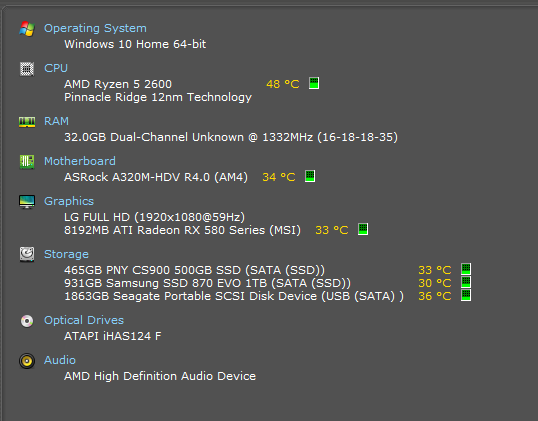
Far more often than not now, at random, my file explorer refuses to operate properly. It started when I was playing The Sims 4 one day and thought that was the issue. I was unable to open the file explorer folder and if I was I was unable to actually go to any folders without constant loading.
Restarting windows explorer did not help at all.
It stopped when I stopped playing the Sims but has gotten worse lately. Now it happens at random. Not to mention thumbnails are completely blank pages if it manages to load at all. It fixes on restart, or so I thought. Today I have restarted three times in under a few minutes. I don't know what caused it. I was using sims 4 studio if that helps. It also happens after I use VR chat.
Now I am left with this no folders but 'quick access'. Completely blank icons or 'working on it'. I have already tried unchecking off the Show recently used files in Quick access and Show frequently used folders in Quick access and clearing file explorer history. What this did was completely remove every single folder from the side and now I cannot access any folders.
I ran troubleshooting through search and index. It told me at first windows search wasn't working and 'fixed it'. It only made it worse by starting that 'working on it' and only 'quick access' thing.
Restarted, ran the file and folder troubleshooter. It found three problems I think, cannot remember the last few but I know it said that recycle bin was corrupt.
It said it fixed it. Upon logging back on, it had not.
I can no longer click the file explorer >view> options button as it is completely greyed out
I had run system file checker and there were no errors. I tried to run DISM but it gets stuck at 62.3% or something.
I am currently rebuilding the index so I cannot really do anything else until it finishes. Just now I was able to get back into my folders but the indexing is not complete yet.
It makes things very difficult because I can't even use anything that requires me to open a folder and find a file. Even through programs, not just file explorer.
I'm not sure if this is related but everything automatically saves to my onedrive documents/downloads/pictures folder. My one drive is full and a lot of stuff in those folders (the sims screenshots is a big one) never load their thumbnail. I have to click on it manually every single time. I don't know what to do about this.
I have plenty enough memory in my comp to handle multiple tasks so I can't imagine it's a memory issue. It rarely goes above 50% unless I am rendering a big scene in DAZ (I have 32gb of memory)
I have tried looking in event viewer to see what is happening but can never find anything. The only thing I ever find is warnings when I restart about the COM server, and this:
The AMDRyzenMasterDriverV17 service failed to start due to the following error:
The system cannot find the file specified.
Idk what that's about.
 Back to top