

​How to make 2 or more partitions on an USB stick? Thank you



Posted 12 August 2020 - 02:34 AM
​How to make 2 or more partitions on an USB stick? Thank you
Moderator

Posted 12 August 2020 - 07:59 AM
I just tried what I would have advised...and I received the same warning reflected above. I had never given it any thought until you posted.
Windows treats a flash drive in the same manner that it treats a CD/DVD, not a drive.
Louis

Posted 13 August 2020 - 09:44 AM
Interesting...thanks Hamluis; I didn't think about this either.
Because of the high number of abandoned threads, if there is no response after 3 days I remove the post from my answer list. If you wish further help after that PM me.

Posted 13 August 2020 - 04:41 PM
You don't, because it is a removable Disk!
A removable disk cannot have multiple partitions
Any utilities you find that allow multiple partitions on a removable disk are simply creating virtual partitions inside the single primary partition
The only way to have multiple partitions on a thumb drive is to purchase a "Fixed Disk" thumb drive
Examples are the Corsair GTX
or any thumb drive that is Windows To Go certified
A few Sandisk Extreme thumb drives used to be fixed disk, but they did not have TRIM or Garbage Collection and Sandisk stopped selling them
The best / fastest / most reliable Fixed Disk thumb drive you can get is the Corsair GTX
It will run Windows 8.1 or Windows 10 as fast as my Samsung 850 Pro SSD
It is FAAAAAAST!
......and you can have multiple partitions.
Edited by Some-Other-Guy, 13 August 2020 - 04:55 PM.
Posted 14 August 2020 - 03:16 AM
You can make multiple partitons on an USB stick but you need the appropiate program/firmware by NAND manufacturer.

Posted 14 August 2020 - 08:13 AM
I think this is more a Windows limitation than a hardware one. Special tools (e.g. for creating USB installation media for OS's) often divide USB flash drives into multiple partitions.
Later versions of Windows 10 can handle (and format) flash drives with multiple partitions http://woshub.com/creating-multiple-partitions-on-a-usb-drive-in-windows-10/

Posted 14 August 2020 - 11:51 AM
Thanks for the info!
Unfortunately, you still have only 1 primary partition with additional partitions being "logical" and will not be seen from other Operating Systems
Sometimes that is a good thing, sometimes bad
A fixed disk thumb drive can have more than one primary partition and they can all be accessed from other operating systems

Posted 14 August 2020 - 01:59 PM
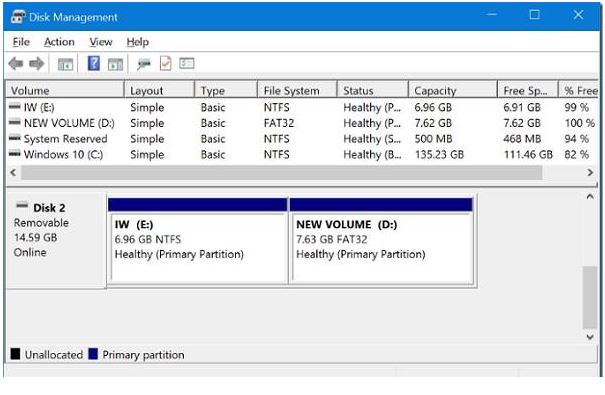
@Some-Other-Guy, the image from the link jonuk posted shows 2 primary partitions on the Removable Drive. E and D
Edited by JohnC_21, 14 August 2020 - 01:59 PM.
Posted 14 August 2020 - 02:04 PM
Thanks everyone for helping out. I found a working method to make 2 primary partitions on a USB drive.
Posted 14 August 2020 - 02:12 PM
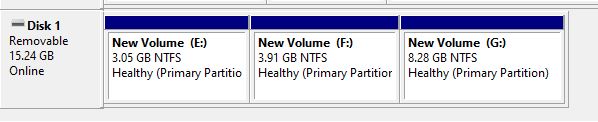
I wanted to see if I could do it in Windows 10 on a Removable Drive. I put 3 primary partitions on the USB flash drive.
Posted 14 August 2020 - 03:26 PM
What is the purpose?
You still only have a single usable primary partition
You can have 3 partitions but you can only use one of them at any given time
I was under the impression that the OP wanted to access and use more than one partition at the same time
Posted 14 August 2020 - 03:47 PM
Okay, I think I know what you intended. You are right. Windows can only boot from the first partition but I beiieve linux can boot from a partition other than the first. I think putting more than one partition is good if you want to boot an OS off the first and want to keep the second primary for
data only.
When you mean one partition at a time do you mean one OS at a time?
Edit: I think I understand now. I created two partitions on a flash drive. One FAT32 and the other was NTFS, both primary. I mounted Hirens PE and copied all the files to the FAT32 partition and booted Hirens. Once I got to the desktop of Hirens, the NTFS partition was not detected.
Edited by JohnC_21, 14 August 2020 - 04:13 PM.
Posted 14 August 2020 - 06:33 PM
I was under the impression that the OP wanted to access and use more than one partition at the same time
Yes this is exact what I tried to do.
Edited by eppixx, 14 August 2020 - 09:04 PM.
Posted 14 August 2020 - 11:41 PM
I was under the impression that the OP wanted to access and use more than one partition at the same time
Yes this is exact what I tried to do.
How to make my external ssd like a usb flash drive? to create a bootable ssd
I think you mean, make your USB Flash Drive like an SSD....
Buy a Fixed Disk Flashdrive like the Corsair GTX!
It "IS" an SSD!
and the random read/write IOPS are WAAAAAY better than any removable disk thumb drive
A regular (removable disk) thumb drive can sometimes be OK for Linux if it's fast enough, but you will never be satisfied running Windows on anything less than the Corsair
What are you going to use it for?
Edited by Some-Other-Guy, 14 August 2020 - 11:46 PM.
Posted 15 August 2020 - 12:07 AM
Buy a Fixed Disk Flashdrive like the Corsair GTX!
It "IS" an SSD!
and the random read/write IOPS are WAAAAAY better than any removable disk thumb drive
A regular (removable disk) thumb drive can sometimes be OK for Linux if it's fast enough, but you will never be satisfied running Windows on anything less than the Corsair
What are you going to use it for?
Sorry for not being clear. I mean the opposite. I have this HyperX SSD. I put it in an enclosure.
How can I make this HyperX like a Corsair GTX Fixed Disk Flashdrive?
So, I don't need to pay extra for a new Corsair GTX.
 ​
​
Edited by eppixx, 15 August 2020 - 12:07 AM.


0 members, 1 guests, 0 anonymous users
 Back to top

